Rank Higher on Google My Business for Local SEO

Table of Contents

How to Rank Higher on Google My Business for Local SEO

In this era of technology, claiming and verifying the GMB (Google My Business) listing of your local business is critical for your local SEO strategy. According to the Statista stats, Google dominates the global search engine market and holds more than 92 percent of the total market share. Moreover, Socialty Pro reports that 46 percent of people searching on Google have a local intent in mind, and 86 percent of people use the internet to search for a local business on Google Maps.

That’s why it’s vital for any local business to rank higher on the Google search engine in order to survive online. Not only will it increase the chances of your business to show up in Google’s organic rankings, Google Maps, Local Finder, and Google Local Pack, but it’ll also improve your total number of customers. In this article, we’ll discuss how to use GMB to increase your foot and website traffic in order to improve your conversion rate.

Google My Business Secrets E-book

Download Our Google My Business Secrets E-Book!

How to Optimize Your Google My Business

how to rank higher on Google My Business

The first step is to claim your Google My Business profile if you haven’t done it already. It’s also important to note that if you want to rank your local business on Google effectively, you’ll need to create your business profiles on other popular platforms such as Facebook, Yelp, etcetera as well. That’s because Google relies on these platforms to validate and aggregate your business information and ranks the profile accordingly. The following are the best tactics that you can use to rank higher on GMB for local SEO.

Name of Your Business

It’s critical to ensure that the name you enter on your GMB profile is exactly the same as mentioned on your website and other platforms. Otherwise, you won’t be able to achieve the desired results. Moreover, getting your Google My Business profile suspended is the last thing that you want.

Hours of Operation

Google My Business also asks you to enter the working hours of your business. You need to make sure that you enter this information carefully because you don’t want anyone to call you outside of working hours.
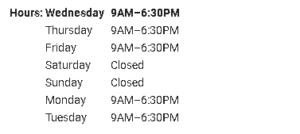
Google my business hours of operation

 Not only will it frustrate people, but it’ll also cause the loss of potential customers. Moreover, it’s also import

ant to make sure that the same working hours of your business are also mentioned on your website as well as other platforms. It’ll work as a signal to Google that the entered information is accurate.
Correct URL to a Working Website

Entering the correct URL to a working website allows people to see the real people behind the services or products they’re purchasing. If you have a single location business, you can simply use your website’s landing page URL. On the other hand, if your business operates on multiple locations and has multiple landing pages for each location, you’ll need to ensure that GMB redirects people to the right location page.

Area Where Your Business Offers Services

Google My Business also asks you to enter the location(s) along with the zip codes where your business provides services. Even if you feel that you don’t need to enter your business location because you already serve customers in that area, it’s better to fill it out. Bear in mind that the customers that are physically closest to your business are the ideal ones. That’s why it’s important not to add the areas or zip codes of the places where you can’t offer services.

Attributes

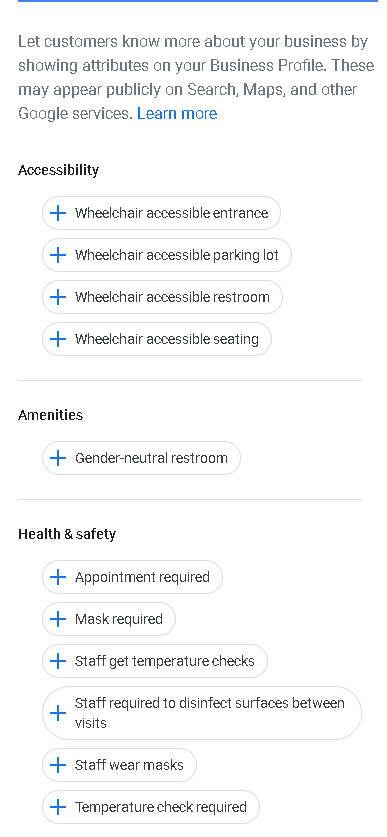
The best way to tell your customers more about your business is to use Attributes. Google My Business allows you to enter information about the type of services your business offers, such as accessibility, dining, payment, lodging, amenities, etcetera. You’ll need to choose only the relevant attributes to guide the visitors appropriately to choose your services over your competitors.

Photos

The very first thing that people notice about any business on Google My Business profile are photos. You need to make sure that you upload the photos that reflect your services or products most effectively and positively. Google My Business currently allows you to upload three different types of photos, which are:

  • Cover Photo
  • Logo
  • Business Photos

If you own a service-based business, then upload as many before and after photos as possible. Make sure that the photos you upload are attractive and clear to allow the people to envision themselves with your business.

Google My Business Attributes

Description About Your Business

It’s one of the most important factors that play a vital role in the local SEO of your business. You’ll need to enter a detailed description of your business that includes all the relevant and important keywords. In this section, you’ll also need to ensure that you clearly describe the type of products or services your business offers. Bear in mind that it’s never wise to overuse the same keywords, and you also mustn’t sound repetitive.

Products and Services

Providing people with the right details about your products and services allow them to make quick purchasing decisions. You can use this section of your Google My Business profile to showcase your products/services in order to inform people with enough information about your business who don’t usually open websites.

Note: Bear in mind, the products and services categories that Google currently offers are still in their beta phase.

Reviews

The majority of the online users searching for particular services or products read online reviews that greatly affect their decision. That’s why it’s critical to have positive reviews on your GMB profile to attract more people. It’s one of the simplest ways to increase your conversion rate. However, you need to make sure that you maintain the online reputation of your business.

Google My Business post example

GMB Posts

Last but not least, the GMB posts that Google showcases to your targeted audience. Not only do you need to make sure that you share Google My Business posts regularly, but you must also incorporate the right keywords as well. This way, your Google will showcase your posts to the most relevant people that eventually improve your conversion rate.

Want Us To Grow Your Google My Business For You?

We are experts at local SEO strategies and can help fully optimize your Google My Business, post on your behalf, and fully manage everything that you need to increase your rankings in the local map pack! Schedule a free call with us below to see how we can help your grow your business online today!

With SocialtyPro

SocialtyPro is the world’s premier “Done for You” organic TikTok marketing agency. We help service and product-based businesses thrive on social media by implementing proven strategies, which focus on the latest trends and the things that actually retain audiences, spur engagement, and cause accounts to go viral. Our methods and strategies are tried and true. We know what it takes to blow-up accounts because we’ve been doing it since the dawn of TikTok. So, if you’re ready to hit the ground running from day #1, call us. We are here to help!  Learn more about SocialtyPro by visiting SocialtyPro.

Be the Expert You Are
We’ll Handle the Rest!

Book Your complimentary Strategy Call today!